
The Future of Technology in English Learner Instruction, Part 1
Artificial Intelligence (AI) has quickly permeated our everyday lives. Just a short time ago, it was a futuristic concept. Now, aspects of AI are in your smartphones, in your email, and, increasingly, in the tools you use in your classroom. The question isn’t whether AI will impact education (it already has), but how to use AI to make your life as a teacher easier while elevating ELL instruction.

This blog explores practical applications of AI to support ELD/ESOL instruction. This includes adapting content for different proficiency levels, supporting comprehensible input, creating engaging instruction materials efficiently, and providing timely feedback. But here's the takeaway: AI isn't a teacher replacement. Think of it as a knowledgeable teaching assistant that takes direction, never tires, and helps you reclaim time for what matters most — working directly with your English learners.
What AI Can (and Cannot) Do
The subset of AI we will focus on is Generative AI (GenAI) using Large Language Models (LLMs). LLMs, which are trained on large language datasets, can function semi-autonomously under human guidance. They can produce/analyze content based on specific questions or requests (prompts). ChatGPT is the most well-known example of an LLM, but there are many education-specific tools built on similar technology.
But here's what makes GenAI tools different from other educational technologies you may already be using. Traditional educational technology follows preset rules and pathways. For example, a quiz platform has predetermined questions and answers. A grammar app follows programmed patterns. GenAI tools, by contrast, can generate new content based on your specific request. Ask ChatGPT to rewrite a science passage at a proficiency level 2 reading level, and it will create something unique for your students.
Yet AI has limitations. It can help you create differentiated materials, but it can't replace your knowledge of individual students' needs. It can suggest discussion questions, but it can't facilitate the actual discussion or respond to student thinking in real time. It can translate text into a student's home language, but it can't build relationships that help newcomers feel safe taking risks with a new language.
Practical AI Applications for ELD and ESOL Instruction
Now, let’s get into the specific usage of AI to support the work you're already doing with your English learners.
Adapting Content for Different Proficiency Levels
Making grade-level content accessible to English learners of different proficiency levels is essential. This should also be the responsibility of both ELD and content teachers. Unfortunately, providing appropriate scaffolding and differentiation for multiple levels is extremely time-consuming. Moreover, many content teachers don't know how to do this work effectively.
This is where AI becomes valuable for both ELD specialists and content teachers. Here’s an example: A 9th-grade science teacher has students studying ecosystems. Their proficiency level 4 English learners can handle the text in their textbooks, but their proficiency level 1 students need significant support. To help these students access the text on ecosystems, the science teacher uses this prompt in ChatGPT:
"Rewrite this passage about ecosystems at an [appropriate Lexile level] for an English learner. Use simple sentences, present tense verbs, and high-frequency vocabulary. Avoid idiomatic expressions and figurative language. The passage is: [paste original text].”
Within seconds, the LLM responds with a properly scaffolded version of the text for the proficiency level 1 student. The answer may be exactly what you are looking for, or it may be 80% there but requires some refinement.
The key to getting useful results is to be specific in your prompt and to iterate. For example, tell the LLM exactly what proficiency level you need, what language features to include or avoid, and what content must be preserved. If the answer is not what you expect or falls short, ask follow-up questions or prompts. Feel free to disagree with the answer with your reasons why and ask for a better response.
If you're coaching content teachers on supporting their English learners, teaching them to use AI for differentiation gives them a practical tool they can implement right away. AI is not a substitute for them trying to understand their students' language needs, but it removes the "I don't have time" barrier.
Supporting Comprehensible Text
Your newcomers are building English skills, but they still need to understand the content. AI can bridge that gap by supporting comprehensible text.
ChatGPT can translate text into the L1 language, but it can go further than simple translation by incorporating comprehensible text strategies.
Try this prompt:
"Explain the concept of photosynthesis in Spanish at a middle school level. Then provide the same explanation in English with Spanish cognates bolded."
This gives your Spanish-speaking students access to content while helping them build connections to English academic vocabulary. You can also ask AI to summarize challenging texts in their home language, partially translate (translating only challenging words or phrases), or create visual images that help students understand concepts.
Microsoft Edge's text-to-speech feature adds another layer of support. Students who aren't yet literate in their home language can hear translated text read aloud. Navigate to any webpage, PDF, or document in the browser, right-click, and select "Read aloud." You can adjust the speed and choose from different language voices. This turns written translations into accessible audio support.
Creating Instructional Materials and Activities
AI can analyze texts and generate teaching materials faster than you can create them manually. Here's where the real time savings happen.
Start by asking ChatGPT or another LLM to analyze a text for vocabulary and phonics patterns:
"Analyze this passage for Tier 2 vocabulary words that would be challenging for English learners. Then identify any words that follow the CVCe pattern."
The LLM can pull out academic vocabulary and phonics teaching opportunities you might have missed when skimming the text.
Once you have your target words, ask the LLM to create activities based on these words:
"Create a vocabulary matching activity using these 10 words. Include the word, a student-friendly definition, and an example sentence for each."
You can use these types of prompts with any LLM. However, if you want to try an AI tool specifically designed for teachers, you might want to check out Diffit (www.diffit.me). Upload any text or paste a URL, select your students' reading level and language, and Diffit automatically creates a simplified version along with vocabulary lists, comprehension questions, and even discussion prompts. It's particularly useful when you need to quickly adapt current events articles or authentic texts to a specific reading level.
Generating Questions, Scaffolds, and Assessments
Checking for understanding throughout class time is a given, but creating effective questions and scaffolds requires careful planning. AI can help generate both to match your instructional goals.
For class discussions, start by creating questions that promote critical thinking:
"Create 5 open-ended discussion questions about this text that require students to make inferences and support their answers with evidence."
English learners often know what they want to say, but struggle with the academic language needed to express their thoughts and logic. Providing some initial structure can help boost confidence.
So, follow up with a prompt that asks for sentence starters to pair with those discussion questions.
"Create 6 sentence starters that students can use to agree, disagree, or add to a classmate's idea during a discussion about climate change."
The same principle applies to writing tasks. Use AI to generate the sentence frames students need before they begin:
"Create sentence frames for a 5-paragraph essay comparing two characters. Include frames for the introduction, body paragraphs, and conclusion."
Another use case for AI is to create ad-hoc formative assessments. AI can create multiple question types quickly based on a sample text:
"Create 8 multiple-choice questions about this passage. Include 4 questions about main ideas and 4 about supporting details. Provide an answer key."
Make sure you review the questions and answers for relevance and accuracy (always quality-check AI output). Adjust the suggested assessment as needed, and you're ready to go.
Providing Instant, Value-Added Feedback on Student Writing
Timely feedback matters, but when you're reading 30+ student responses, it's hard to give individualized comments with detailed suggestions for improvement. AI can help you provide more value-added feedback faster.
Copy a student's paragraph response into ChatGPT with this prompt:
"This is an opinion paragraph written by a proficiency level 2 English learner. Identify strengths in their writing and opportunities for improvement. Provide at least one specific revision to improve clarity. Point out grammatical errors. Do not rewrite the paragraph."
AI will give you feedback points you can share with the student. You still make the teaching decisions about which feedback to prioritize, but AI helps you see patterns and possibilities you might miss when you're tired at the end of a long day.
It’s important to note that we do not recommend using an AI tool or an LLM for summative assessment or grading. While it often gets close, AI is still not 100% accurate and should not be used to evaluate “high-stakes” activities.
Specificity Matters
It's no surprise that specific prompts get better results than vague ones. Think of it like giving directions to a substitute teacher. If you leave a note that says, "Teach a lesson on vocabulary”, you'll get something — maybe flashcards, maybe a word search, maybe a lecture. But if you write "Teach these 10 Tier 2 academic words using the Frayer Model. Students should work in pairs and complete one model together, then create three independently," you'll get exactly what you expect.
AI works the same way. Tell the LLM your students' proficiency level(s), what you want included or excluded, and the format you need. Vague prompts like "make this easier" produce vague results that will be disappointing. Detailed prompts can give you usable materials the first time around.
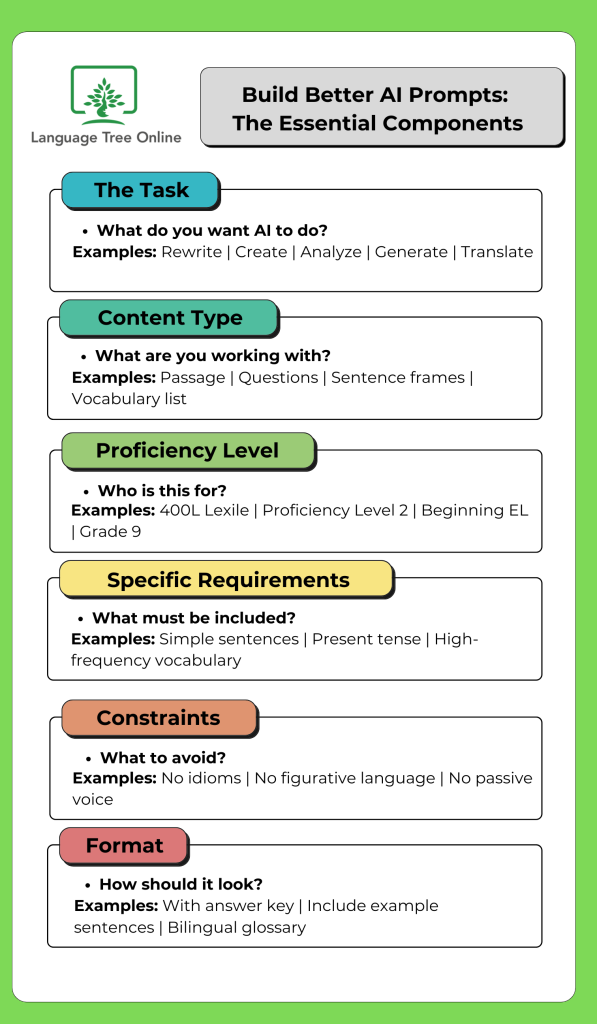
Getting Your Feet Wet with GenAI for the Classroom
If you're new to using AI in your teaching, start with one time-consuming task this week. Creating tiered texts? Generating assessment questions? Translating key concepts? Pick the task that eats up most of your prep time and use AI to handle it.
Just remember to add your own “finishing touch”. It doesn’t replace your knowledge of an individual student’s language and social development. AI can generate a simplified text, but it can't tell you if that text is culturally relevant to your students or if it accidentally includes vocabulary your newcomers studied last week. You make those calls.
AI won't transform your teaching overnight, but it will give you back hours of prep time each week. Use those hours for what matters: working directly with your English learners, refining your instruction, and building the relationships that help students take risks with language. Let AI handle the scaffolds. You handle the teaching.
An Important Note on Student Data Privacy
Don't input student names, ID numbers, or other personally-identifiable information into AI tools. These tools store data from users. If you're using AI to provide feedback on student writing, remove the student's name first. Focus on using AI for creating instructional materials and planning, not for recording or tracking individual student performance.
About Language Tree Online
Want to learn more strategies for supporting English learners? Explore the Language Tree Online resources for standards-aligned ELD curriculum and professional development designed specifically for secondary multilingual learners.